Frequently Asked Questions
Which computer do I need for photography?
Here are recommendations for your next computer, before or after a Thorsten Overgaard Workshop:
Get the fastest computer
I recommend getting the fastest MacBook Pro available. If you want to be mobile and want the most power, get the MacBook Pro 16" Retina screen "spec'ed out" (with the most RAM, fasterst processor, largest disk). If you take your computer with you a lot, the 13" MacBook Pro with external Eizo screen or other large screen if you want to be mobile, but perform most final editing work at home.
Do be aware that a MacBook Pro 16" is much faster than the 13" MacBook Pro. They use different processor families, and generally speaking the smaller MacBook have less space, hence slower speeds internally in all connections.
Get the fastest photo editing software
No doubt, the Capture One Pro software is the fastest software (twice as fast as Lightroom) for photo editing and the one that require the least computer power (you can get away with using a MacBook Air), and you can often get a package deal where you get all their Styles/Presets at a steal where you own the software. No monthly payments.
Further, Capture One preserve more of the original DNG/raw file, meaning better tonality and colors.
It's a learning courve to swithch from Lightroom to Capture One, but it is worth it (buy my Capture One Survival Kit to learn the fastest workflow).
Leica support in capture One
Capture One have further adopted Leica cameras and Lenses and offer updated refining profiles on all digital Leica cameras from Leica M8 (2006) and forward to present time models.

The kissing couple at Rue de la Sourdière in Paris. Edited in Capture One Pro using my own "BW 1980's Overgaard Style". Leica M10-P with Leica 50mm Summilux-M ASPH f/1.4 BC. © Thorsten Overgaard.
Much less computer power needed if you use Capture One, than if you use Adobe Lightroom Classic
Adobe Lightroom CC Classic tend to bog down the computer when it imports (and build previews), and when it exports JPG's. Traditionally, the processor power of the computer is used to build previews and calculate resized exports in JPG or TIFF. That's when the computer sounds like a hairdryer (the ventilator works overtime to cool the processor down).
Capture One doesn't bog down the computer (at all) when it imports and exports, and the building of previews upon import is very fast. Capture One works faster. Much faster.
Speed comparison of editing photographs in Lightroom vs. Capture One Pro:
This is how big a difference there is working with Lightroom 9 and Capture One. This test was performed with 346 DNG files from 24MP camera (= size 20-30 MB each) using a Mac Book Pro 16" (Late 2019, 8-core 2.4 Ghz with 8TB hard drive and 64GB ram):
You could say that if you go do something else when the computer works on import and building previews, and when it exports, who care if it takes 5 or 50 minutes. You are not sitting there and watching it work. If you plan it like that, anything works. But it is an indicator of how well put together the software is.
Using "Styles" or "Presets" to get there faster
I have made a series of my own Cature One Styles for fast editing in high quality. While using Presests in Lighrroom is fun, using Styles in Capture One is often the final edit, or close by. This saves a lot of time and adjustment. I have made he same series of Presets for Lightroom. A little handfull of things to make neat black and white and beautiful color photos. It's all I use. I work fast.

Capture One Pro comes with built-in Styles to make authentic grains as these ones.
Change computer and stay on top
Change computer every 18-36 months to stay in the loop with the fastest technology (things change so fast that a 3 year old computer tends to be really slow). If you change while the previous comptuer is till fairly new, the writeoff i less than if you wait. Hance often and the writeoff is relatively small, yet you get to always have the fastest computer.
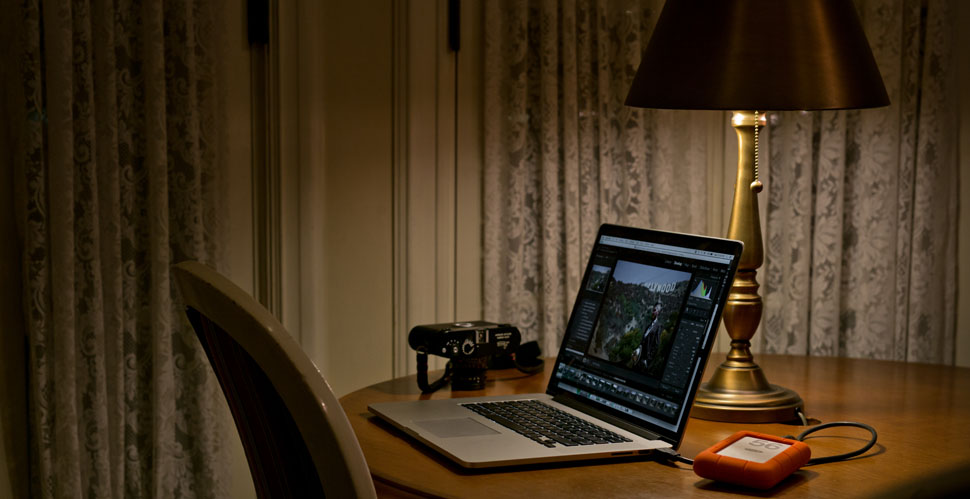
The new is not always the best: In this picture from 2018 of the MacBook Pro 15", the irony is that the previous model from 2015 (with a 'real' keyboard and without touch bar), was still much faster for photo editing. The 16" MacBook Pro is he first model that surpass the 2015 model MacBook Pro in processing power (and it got a real keyboard as well).
This speed test shows how Lightroom performs on different MacBook computers:
If you use Lightroom, which many Leica users still does because it traditionally comes with the Leica camera, you should be aware which Mac computer works the fastest.
This test was performed with 346 DNG files from a Leica 24MP camera. The 2017 model is not in this comparison but was tested to be generally 7% faster than the 2016 model. The 2019 model (the 16") is the first MacBook Pro of the new design that is faster than the old 2015 MacBook Pro.
I haven't done Capture One Pro tests on the comptuers, but generally you can expect the Capture One Pro to perform the same processes at half the time in any of the models.

Get a big Eizo screen
If you want to work on a large screen at home, I recommend getting one or two external screens that connects to your portable, rather than having a "large computer" at home and a "small computer" for travel. It's much easier to have just one computer and not having to sync two computers; and you can invest the money in one really fast computer.

I like Eizo ColorEdge screens for the image quality and 98% of Adobe RGB color space shown, as well as the mechanical quality. An dven better, they self-calibrate with a buil-in calibration device! They connect to the MacBook Pro via a USB Type-C -> DisplayPort cable, or to a Microsoft Surface Pro via an PM200 cable (Mini DisplayPort -> DisplayPort), and you can add two to the same MacBook Pro if you like, so as to get an even wider screen area.
Always buy the fastest computer available
No matter which MacBook model you buy, upgrade the processor to the fastest possible model, and consider to upgrade the hard drive to the largest available. When you look at the Apple website, you can choose which processor, which hard drive, which graphic card and how much ram. You simply upgrade each step, which adds a $100 or more for each selection, and in the end you have the fastest computer avilable. Apple tend not to have these in stock, but then BH Photo usually ahve them ready for immediate shipping. I've talked to Apple several times about this. Apple used to cater to artists, inventors and first-movers, who naturally would want the faster and bigger editions, but for some reason they want to cater to the average user. Never mind, get it from BH Photo then. Same warranty and all, and you can always go to an Apple Store for support of an Apple computer, no matter which country you bought it in, and no matter which dealer.
In the MacBook Air series, they usually come with an i3, or 5 processor, but upgrading to the i7 will increase the speed for photography workflow 4X and only cost $250.
The MacBook 12" was cute, had a great screen, but is also the slowest model for photography workflow. My mother has one and loves it, but she's 74 years old and only uses it for e-mail and online banking.
If you visit an Apple store and compare the 13" MacBook Air and 13" MacBook Pro with the 16" MacBook Pro, you will realize that there's not much difference in size. So, why not get the computer with the largest screen and most speed?
Even I travel 49 of the years 52 weeks, I've choosen the MacBook Pro 15"/16" every time, and I've picked the fastest model available every time. Yes, I travel with my computer, but I never really carry it around. I park it in a hotel or apartment, and then when I travel to the next place I put it in my bag until I arrive in the next place. Only if you always (or often) carry your computer around town with you does it makes sense to get a smaller model.
An iPad Pro with is a toy. In the concext of photogprahy, it adds another layer of things to do that doesn't help you much, unless you really gave a lot of downtime in planes or elsewhere where you feel you can work on pictures. The point is this: To make photographs, they have to be finished and go somewhere. The iPad does not have any output for external hard drive archive. The idea is that the photos stay on the iPad or in the cloud. But you do need to export them to somewhere, and this is how the iPad adds another layer of thigns to do; because you then have to move or sync your photos to a real computer in order to be able to export them. You may meet people who feel strongly that the iPad is great, and that's the whole point. It consume you attention and you forget what you was supposed to do. Working firsrt on iPad, then sync/move to computer adds the layer of possible alteration or loss of data as well. Double work.
Generally, the iPad and smartphones are made to show you things and have you interact with machine-driven social media so you can be exposed to ads and your user account can be sold. If you are an artist, you make things, and real artists ship (export, sell, deliver) things. iPad and smartphones are for entertainment and to sit and doodle at idle periods (no such thing exists for a creative mind), it is not for production (making things).
Dislaimer: I've had five iPads and 3 iPad Pro's over time, just beacuse I felt they might be useful and it felt great buying one. I alwyays end up giving them away and promise myself I will never get another one.
Currently, the MacBook Pro 16" (Late 2019) with 2.4 Ghz 8-core and 8TB hard drive is the one I use. It's the first MacBook Pro since the 2015 model where the speed has improved for photo editing. It also has the feature that you can write on the keyboard (yes, I know).
USB-C and Thunderbolt 3 connections
With it the new MacBook Pro's (Late 2016, Mid 2017, Mid 2018 and Late 2019 models) came the pain of new Thunderbolt 3/USB-C connections and no SD-card reader built-in.
No more SD-card reader in the Late 2016, Mid 2017 and Mid 2018 and 2019 MacBook Pro computers.
| |
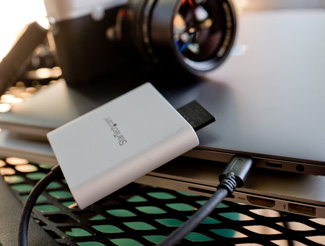 |
| |
StarTech SD-card reader is $30 at BH PHoto |
| |
|
Apple doesn't even make or sell (in the Apple Store) a SD card reader, so you have to visit BH Photo, Amazon or eBay to find a third party SD card reader that goes into the USB-C plug, or a traditional SD card reader with USB and use a USB-C to USB3 dongle.
Using a USB 3 card reader via a dongle is extremely slow. There are more and more USB-C readers available. The one I got is the StarTech ($30).
Then a few weeks later, I got the SanDisk USB-C reader, and that one is better:
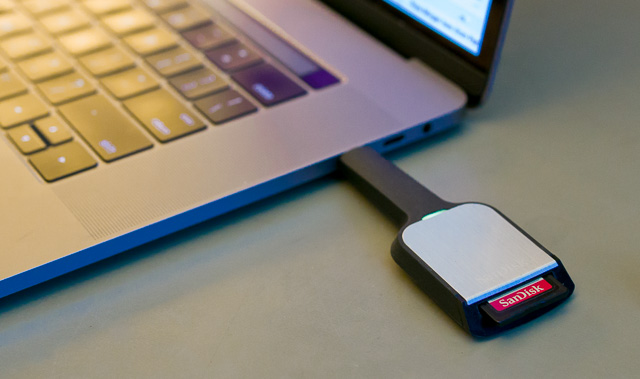
The SanDisk Extreme Pro SD UHS-II Card USB-C reader does the job. © Thorsten Overgaard.

Work simply on a laptop when on the road, and offload to external drives when back home. Here's my hotel room in Jakarta. Leica M 240 with Leica 50mm Noctilux. © Thorsten Overgaard
USB-C is not the same as Thunderbolt 3
The plug for USB-C is the same as for Thunderbolt 3. The confusion on this is so great that the staff in the Apple Store doesn't always know. They will claim it is the same speed. It's not. Thunderbolt 3 is four times faster than USB-C, and that is important when buying a new hard drive: LaCie makes hard drives with USB-C (USB 3.1) connections and Thunderbolt 3 connections for this reason, but many portable drives have just USB-C connection. USB-C speed is rated as 10GB/sec and Thunderbolt 3 is rated as 40GB/sec. This is so little known, most will claim USB-C and Thunderbolt 3 is the same connection and speed (though it was specified in the 40 page document following the release of the MacBook Late 2016).
Thunderbolt 3 hard drives
Hard drives with USB-C are not the same as Thunderbolt 3. The LaCie 6TB, 8TB and 10TB d2 drives are the first ones with real Thunderbolt 3 cables and speeds.
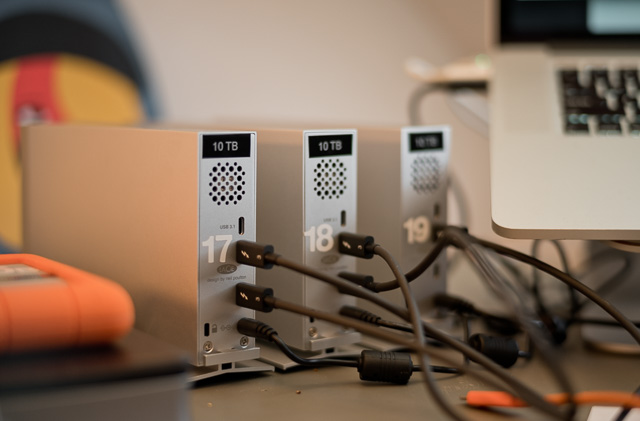
My LaCie 10TB drives with one USB-C connection (top) and two Thunderbolt 3 connections. It's $500 for this model at BH Photo. The cables for USB-C (has a USB-symbol) and Thunderbolt 3 (has a thunder synbol and 3) are different.
In computers, look at performance, don't listen to the hype
When the new MacBook Pro was announced, it was announced as "Metal on all four sides" and "17% thinner than the previous model" and so on. That's how they sold us Thunderbolt some years ago and that's how the MacBook 12" may sound great (even it is the worst for picture editing).
It's difficult to not get enthusiastic about the new, but make speed comparisons before you go get it all.
Read the numbers carefully below, not the names of the connections!
With Catalina 64bit Operating System some software died
For photographers, you must update Lightroom, Capture One Pro, Photoshop and other essential tools. Most of them it doesn't make much difference.
Then there are other software that doesn't make the step up to 64bit, and you have to replace that software and eventually any previous catalogs you made in them. Media Pro virtual catalog (DAM software) is not being updated for 64-bit, so you will ahve to go with Adobe Bridge or Photo Medhanics.
Which external hard drives do I need for photography?
You need external hard drives for storage, and you usually need two so that one is your storage, the other is your backup. In other words, you always buy two, four, six or eight hard drives at a time.
Portable hard drives have a live span of 12-18 months before you want to replace them with a bigger one. You think they will last forever, but your need for storage grows faster than you think. The good news is that price of hard drive space drops with the same speed as your need more space.
Speed test and comparison of Thunderbolt, USB-C, SSD hard drives
|
| MacBook Pro SSD internal read/write speed |
|
2000 - 2700 MB/sec |
|
Thunderbolt 3 to external SSD
|
|
|
|
USB-C to external SSD RAID
|
|
900 MB/sec |
|
USB-C to external SSD
|
|
450 MB/sec |
|
Thunderbolt 3 to external RAID
|
|
400 MB/sec |
|
| Thunderbolt 2 to external RAID |
|
137 MB/sec |
|
| Thunderbolt 3 to external hard drive |
|
117 MB/sec |
|
| USB-C to external hard drive |
|
103 MB/sec |
|
| Thunderbolt 2 to external hard drive |
|
80 MB/sec |
|
| USB-3 to external hard drive |
|
75 MB/sec |
|
| USB-2 to external hard drive |
|
40 MB/sec |
|
As you can see, the hard drive determines the speed more than the connection.
With new MacBook Pro 15" (Late 2016, Mid 2017 and Mid 2018) and MacBook Pro 16" (2019) that has four Thunderbolt 3 conncetions (which looks the same as USB-C), you don't really have a choice. You can use dongles/converters for a while, but all future things you buy should be directed towards USB-C/Thunderbolt 3 (when Thunderbolt came out, you could get FireWire to Thunderbolt converters, and they work; but you want clean cables without having to use dongles/converters).
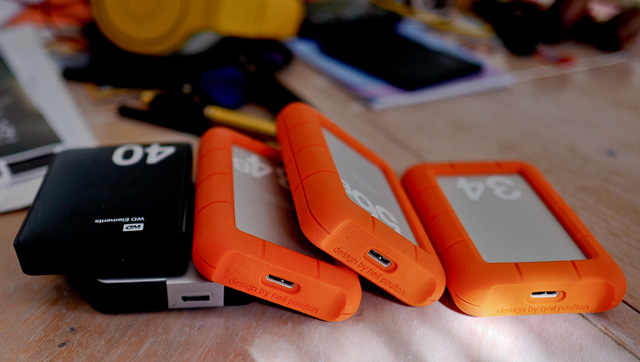
My portable hard drives are currently 4TB LaCie Rugged (USB3) and 2TB Western Digital (USB3) and 2TB USB-C LaCie Porsche.
Remember, you will buy a new one anyways in 12-18 months. Go with USB 3 if you can, and don't spend much time reconsidering this decision until portable SSD hard drives come down into a reasonable price range. (There will be coming a new type of SSD hard drives that you can expand unlimited - e-mail me for more info on this so you get a notice when they are available).
Make sure to avoid portable hard drives that require external power supply! Not much compactness in having a small drive that needs a power supply. A portable hard drive should be powered by the USB or Thunderbolt cable.
Desktop hard drives are a little different in that they last for 3-5 years. Then you want to upgrade them to larger ones because you need more space and the connections becomes obsolete. FireWire 400 (invented 1995) and FireWire 800 (introduced 2009) have died out. Again, time works for you, the price of a top-of-the-line 120 GB hard drive in 2000 was $400 back then, and a 6,000 GB hard drive today costs $400 as well.
This is how big (or small) a difference there is between FireWire 800, USB3, Thunderbolt 2 and Thunderbolt 3:
|
|
FireWire 800
hard drive |
|
USB 3
hard drive |
|
Thunderbolt
2
desktop
hard drive
LaCie 6TB |
|
Thunderbolt 3
desktop
hard drive
LaCie 6TB
LaCie 8TB
LaCie 10TB
BH Photo |
|
Thunderbolt 3
RAID desktop
hard drive
LaCie 20TB
LaCie
28TB
LaCie 32TB
BH Photo |
|
Read/write/copy speed
|
|
71 MB/sec
|
|
75 MB/sec |
|
137MB/sec |
|
117MB/sec |
|
460MB/sec |
|
| |
|
The lesson on FireWire, USB, Thunderbolt and the new Apple USB-C Port is that it's the size of the connections that change dramatically, not so much the speed. But the hype with each new type makes you buy new equipment, and that's the main feature.
The USB-C is genius in that it is one connections for power, drives, screens and all. But don't believe for a second it's faster.
What gives real speed is RAID hard drives. The LaCie RAID perform 460MB/sec writing speed, and a RAID SSD can do 1800 MB/sec.For RAID to be fastest, it is set to RAID 0 (writes the data in stripes across severeal hard drives).
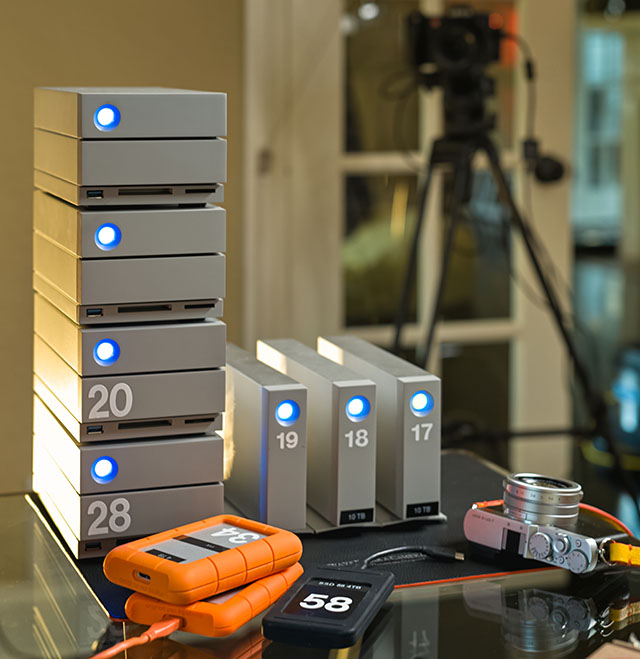
Some of my hard drives: To the left is four LaCie RAID "DOCK" 28TB Thunderbolt 3 hard drives (460MB/sec) with SD-card reader and other memory card slots (hence the name "DOCK"). To the right are three 10TB LaCie Thunderbolt 3/USB-C hard drives (117MB/sec).
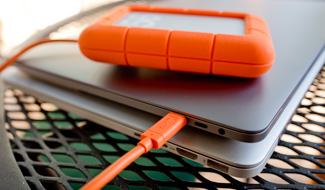
In front are is 4TB LaCie USB-C Rugged hard drive, and below it a 2TB Rugged USB-C hard drive. The black hard drive in the bottom center is a super-fast Glyph Technologies RAID SSD 4TB potable drive with USB-C (1800 MB/sec). Alle the portable drives on the table are powered from the computer alone, which is what you want for any hard drive you take with you on travel.
USB desktop hard drives vs
Thunderbolt desktop hard drives
You can set up several USB 3 external hard drives via an $18 USB 3.1 Hub so they are all connected at the same time. As the Hub provides power as well, you can actually go with portable drives instead of the Desktop hard drives (that all requires a separate power supply). If you don't depend on speed but use the connected hard drives for archiving (and photo editing, video editing, etc. on the much faster internal SSD/Flash Memory), this is actually worth considering. The USB hub also can charge iPhones and stuff.
Thunderbolt 2 and Thunderbolt 3 hard drives can be connected in "daiseychain" which means you have one cable going out of the Mac to the first hard drive, then a Thunderbolt from that to the next and from that to the next. They are all connected this way, although it requires that the desktop hard drive needs two Thunderbolt connections (one in and one out).
One of the problems with Thunderbolt 2 is that the cables go black for no reason. They simply stop working. Some times, after some weeks of rest they may work normally again. If you have a rather complicated setup of drives it's annoying to locate the faulty cable and replace it. Others have reported that Thunderbolt cables caused errors that wiped their hard drives. All in all, it's an easy technology but not a very stable one. We all got into it because "Thunderbolt" sounds so cool, and it's the future (and who doesn't want to be in that?).
| |
 |
| |
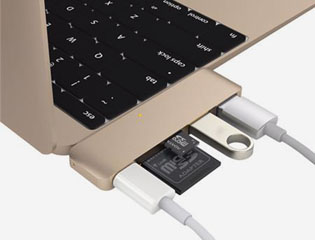
Sanho 5-in-1 hub for MacBook USB-C is necessary in order to plug in more than one thing. It's a mess..! |
| |
|
Next thing will be USB-C which was introduced on the MacBook 12" in 2015 and that's also what is on the new redesigned MacBook Pro (Late 2016), wich they call Thunderbolt 3 on that one. (It has 4 Thunderbolt 3 connections and nothing else).
Thunderbolt 3 read/write supposedly up to 4X faster than USB-C even they plugs look the same. If you connect a USB hard drive via the USB>USB-C dongle, the speed will obviously be that of the slowest cable.
In the MacBook 12" it's very unpractical as it is the one and only connection for power, hard drives, scanners, phones and all. "Be careful what you wish for", as the Apple CEO said about that feature.
Do what seems most practical. As long as you have backup of your hard drives, the problems will never be bigger than what you can overcome. I very much buy hard drives the same way I buy Xerox paper: the price per pack for 500 sheets of Xerox paper, and the price for a 1TB hard drive. I simply make a piece of paper where I list and compare the current models: Speed, Connections, price per TB). If I had smaller storage needs, I would use portable hard drives only. Nice, easy and compact.
As I don't expect any of my desktop hard drives to be with me for more than 3-5 years, I don't invest in one large system or one large 30TB hard drive. I buy a hard drive that will keep me going for a while; and in 6-9 months when I need more space, I compare and get the next one.
Price comparison of hard drives (January 2024)
Best buy in hard drives:
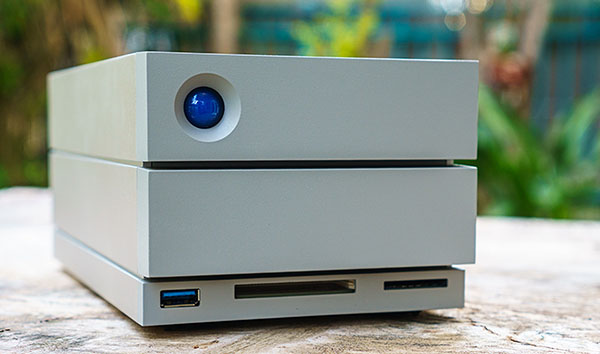
As of January 2024, the 20TB or 28TB or 36TB LaCie Thunderbolt 3 DOCK with raid and several connections, including for screen, as well as memory card reader, is a really good price per TB. It has a transfer speed of 460MB/sec when connected with the Thunderbolt 3 cable. Only two things against it is that it has a ventilator (20 db noise) and it takes some time to wake up. See review here. Price $ 1,095 at BH Photo. Mine is in a small closet so I don't hear it, and I simply connect my laptop next to it over in the closet and go back to my desk and work on the screen that is connected to the LaCie.
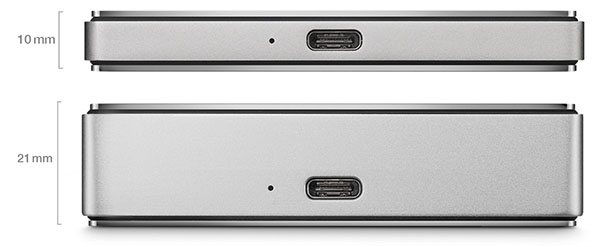
In portable hard drives, my favorite is the 2TB LaCie Porsche because it's so slim ($46 per 1TB). The bulkier 5TB is only $32 per 1TB which is the best price across the lines of portable USB-C drives, but a chunk of metal. It's okay if you have a pocket or place for it in the bag, I guess, but the slim 2TB slides into any space.
My other portable favorite is the Glyph 4TB SSD RAID (USB-C), which is the fastest writing speed (1800 MB/sec). Very compact, and $850 for a 4TB hard drive. Read my article, "Review of Solid State Drives"
Apple or Microsoft?
Apple computers has traditionally been the best for photography workflow. I used to say that, even if you work with a PC for work, consider an Apple for your photography. But well, things are changing. Apple seem to have a hard time to keep up, and meanwhile for example the Microsoft Surface computer prove to be an excellent platform for photo editing. So, if you heard me say "get a Mac" in the past, let me modify it to, "Consider a Mac, but if you're willing to work with the PC interface, consider a Microsoft Surface computer".
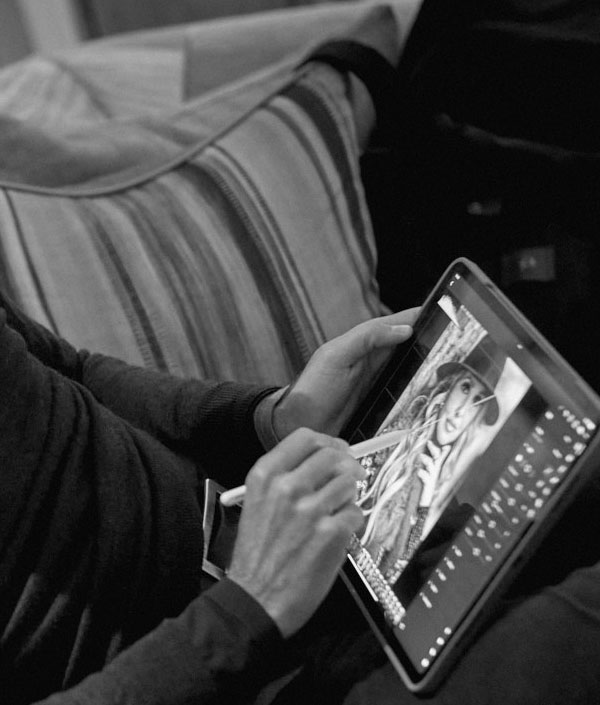
The Microsoft Surface Pro computer where you can take off the keyboard and use the screen with a pencil, or a wheel you attach (magnetically) to the screen. They come as 15" with 1TB and i7 Quad-core processors. See MacRumors review of MacBook Pro vs Microsoft Surface.
|